
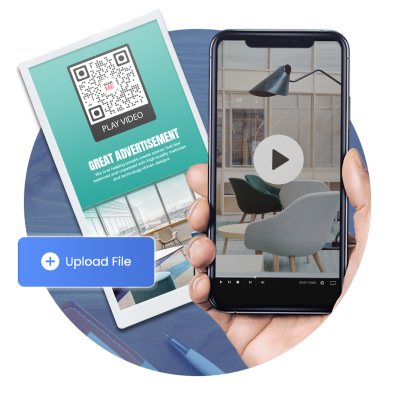
Advanced video QR code generator
Our Video QR solution lets businesses share videos with a scan. Whether you’re sharing a product demo, tutorial guide, promotional video, or your brand’s story, our platform allows your team to share any video assets seamlessly.
What is a video QR code?
This dynamic solution lets you share an MP4 or any video file through a QR code. With a scan, the user gets to view or save the video on their device.

Share videos anywhere
You can place your video QR on printed materials or a website. Use it to share greetings, learning materials, tutorials, or any content.

Scan to watch videos
Let scanners enjoy watching videos with a quick smartphone scan. Boost views by sharing videos with our QR code.
What are the benefits of using video QR codes?
Share videos in a faster, more time-efficient way. Turn every scan into a surprise watch party. Here’s why you should use this tool:

Smart video-sharing tool
QR codes are a better and faster alternative tool for sharing videos or MP4 files. No need for Bluetooth or uploading your file to a cloud storage service.
Editable anytime
It’s a dynamic solution that allows users to edit the stored data. This means you can replace the stored video file with a new one whenever you want.
Get better insights
QR TIGER’s built-in tracking feature lets you analyze your audience’s scanning behavior. You’ll learn how many, how frequently, and where your scanners are from.
Wide application
This tool can be used across industries: education, healthcare, marketing, real estate, tourism, and more. Using a QR code for video, businesses and organizations can easily boost engagement.
Video content is superior
Eighty-nine percent of consumers prefer to see more videos from brands. 72% of them watch videos for product research. 70% of US digital video viewers use their smartphones to watch videos.
Why QR TIGER is loved by global brands
We make video sharing made simpler, faster, and more secure
Wide design options
Make your QR codes unique by blending your own brand elements or creativity. Based on our studies, branded QR codes attract 80% more scanners.
Complete solutions
Our long list of need-specific solutions is growing to provide individuals, businesses, and organizations with an all-in-one QR code software.
Compatible with 100+ software
Integrating our system with your favorite CRM platform is easy. Use your QR TIGER API to connect your account with other software.
Advanced tracking
Manage and monitor all your QR code’s performance in one place. Easily access your dashboard to measure your QR campaign’s success.
24/7 assistance
Our customer support team is always ready to assist you anytime. They’re equipped to provide answers to all your QR code queries.
Powerful system
Enjoy an efficient system and uninterrupted service with our software. Built with 99.9% service uptime and rapid auto-scaling server cluster.
Frequently asked questions
Can I convert a video to a QR code?
Users are free to customize their own QR code design and add a logo. They can match it with their branding or be creative to make their QR unique.
How to convert a video to a QR code?
What is a video QR code generator?
It is a platform specifically built to generate unique QR codes for videos. The video QR solution can store your MP4 files to make your videos accessible in just one scan.
How does a video QR code work?
How to create a QR code for a video?
Go to QR TIGER online to create your own QR for video. Choose the Video QR solution > Upload the MP4 file > Generate QR > Customize and add a logo to the QR > Download, save, and share.
What videos can I store in a QR code?
Can I update the video linked to a QR code after printing it?
You can update the video stored in your QR code even after printing it. Our QR code video is a dynamic solution so users can change or replace the MP4 file anytime.
What formats are supported for videos in QR codes?
Is there a file size limit for videos linked to QR codes?
You can upload videos with 5MB to 60MB using our video QR maker. If your video has a larger file size, you can use URL QR to redirect scanners to your videos online.
Do video QR codes require an internet connection to work?
Video QRs require an internet connection to access the stored file. Hence, scanners need to connect first to a network to watch or save the video.
Can I customize the appearance of a video QR code?
Users are free to customize their own QR code design and add a logo. They can match it with their branding or be creative to make their QR unique.
Are video QR codes trackable?
Video QR code users can easily track their QRs directly from their account dashboard. They can see how many have scanned the code, how frequently it is scanned, where the scanners mostly come from, what device they mostly use, and more.
How do I track my video QR code?
Where can I use my video QR code?
his tool has wide applications in most industries. It can enhance marketing materials, product packaging, posters, brochures, flyers, billboards, magazines, business cards, and more.
Download the QR TIGER App



'QR Code' is a trademark of DENSO WAVE INCORPORATED. © 2026 www.qrcode-tiger.com